Why It's Time to Move Your Website Off WordPress (and Why Next.js Wins for Static Sites)
Faster pages, almost nothing to hack, no plugin updates, cheaper hosting. Why a Next.js static site beats WordPress for blogs, portfolios and business sites.
You open your WordPress dashboard on a Monday morning. Fourteen plugin updates are waiting. One of them says "security fix". Another one, last time you updated it, broke your contact form. You sigh, take a backup, and click Update.
If that feels familiar, this article is for you. WordPress isn't bad. It runs a huge part of the web (around 43% of all websites, according to W3Techs). But for a big group of sites (blogs, portfolios, company pages, documentation, landing pages), it is now doing far more work than the job needs. And you pay for that extra work in speed, security and your own time.
This very site, CrunchCube, started on WordPress with Elementor. It now runs on Next.js as a static site. Here's why that switch makes sense, and when it doesn't.
The simple idea: cook to order, or bake at dawn
Think of two food shops.
The first is a restaurant where the chef cooks every plate from scratch when you order. Want a sandwich? The chef checks the recipe book, fetches the ingredients from the store room, cooks, plates it, and hands it over. If fifty people walk in at once, the kitchen gets busy and everybody waits.
The second is a bakery that bakes everything at dawn. By the time the doors open, every loaf is ready on the shelf. You walk in, point, and walk out with your bread in seconds. Fifty customers? No problem. The baking was done hours ago.
WordPress is the restaurant. Every time someone opens a page, PHP code runs, the database is queried for the post, the menu, the widgets and the settings, and the page is assembled on the spot. Caching plugins help by keeping some plates warm, but the kitchen is still there.
A static Next.js site is the bakery. When you publish, Next.js builds every page into a plain HTML file, once. When a visitor arrives, the server just hands over a file that already exists. No PHP, no database, no assembling.
The real thing: what "static" means in Next.js
Next.js is a framework for building websites with React, a popular JavaScript library for user interfaces. It can render pages in several ways, but the one that matters here is static export.
Static export means Next.js turns your whole site into a folder of ready-made HTML, CSS, JavaScript and images when you run the build. You can put that folder on almost any host: shared hosting, a CDN, Cloudflare Pages, Netlify, even an old Apache server.
Switching it on is one line in the config file:
// next.config.ts
import type { NextConfig } from "next";

const nextConfig: NextConfig = {
  output: "export",     // build the site as plain static files
  trailingSlash: true,  // /about/ instead of /about, like WordPress URLs
  images: { unoptimized: true },
};

export default nextConfig;
Run npm run build, and you get an out/ folder. That folder is your website. Upload it, and you're live.
Reason 1: it's faster, because there's less to do
A page is fast when the browser gets useful content quickly. Google measures this with Core Web Vitals: how fast the main content appears (LCP), how quickly the page reacts to a tap (INP), and whether things jump around while loading (CLS). These feed into how Google ranks pages.
A static page has a head start on the first one. The server doesn't run any code or ask a database anything. It just sends a file, and files can be cached on a CDN close to your visitor. Someone in Mumbai and someone in London can both get your page from a nearby server.
WordPress sites can be fast too. But it usually takes a caching plugin, an image plugin, a minify plugin and careful theme choices, and page builders tend to load a lot of extra CSS and JavaScript on every page. With Next.js, fast is the starting point, not something you bolt on later.
Here's the real report for this site's home page after the move to Next.js. It was tested with GTmetrix on 4 November 2026, from a test server in Seattle, USA, using Lighthouse 12.6.1:
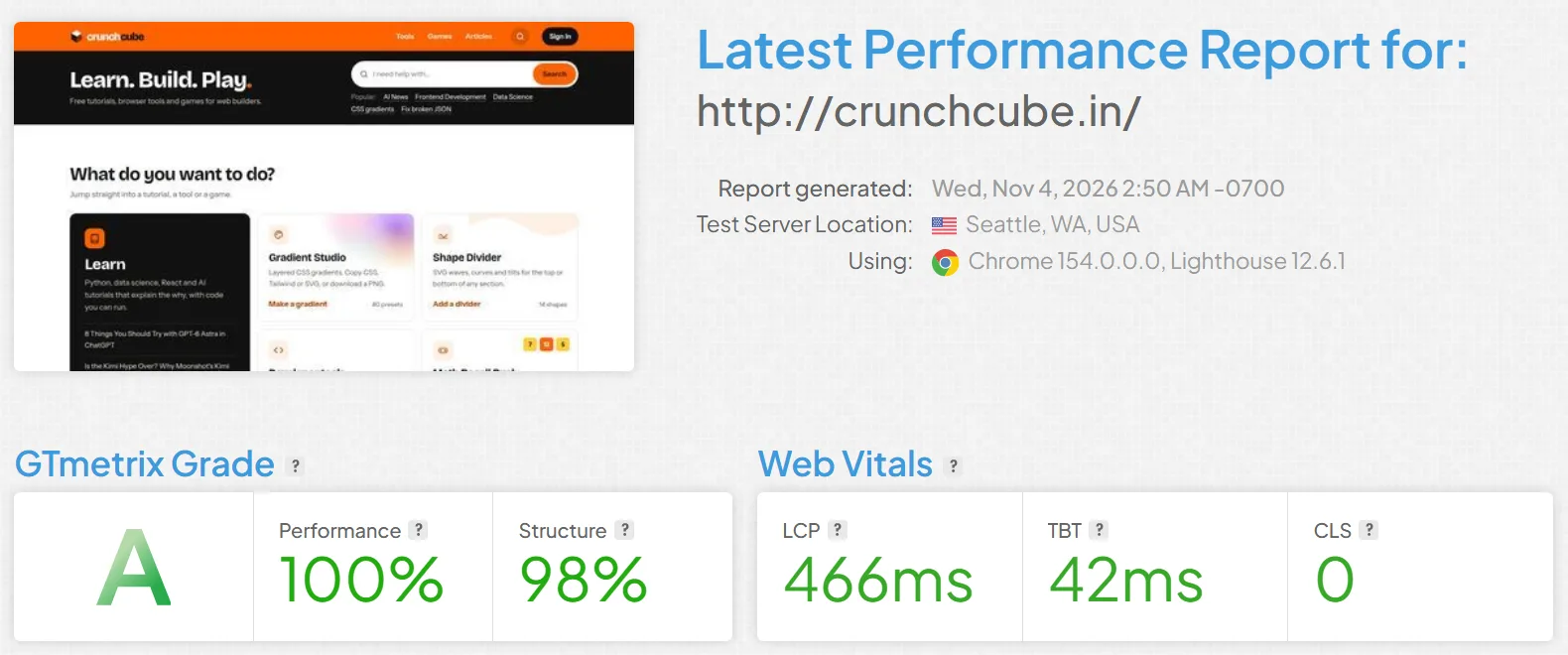
| What it measures | Score | Google's "good" mark |
|---|---|---|
| GTmetrix grade | A (Performance 100%, Structure 98%) | |
| LCP: how fast the main content shows | 466 ms | under 2.5 s |
| TBT: how long the page is too busy to respond | 42 ms | under 200 ms (Lighthouse) |
| CLS: how much things jump around while loading | 0 | under 0.1 |
That's the main content on screen in under half a second, with nothing jumping around, and no caching plugin anywhere. TBT (Total Blocking Time) is the lab stand-in for INP: it adds up the moments when JavaScript keeps the page too busy to react to a tap.
Reason 2: there's almost nothing to hack
Here's a number worth knowing. Patchstack, a WordPress security company, counted 11,334 new vulnerabilities in the WordPress world in 2025. 91% were in plugins, 9% in themes, and only 6 were in WordPress core itself. And 46% of them had no fix from the developer when they were made public.
So WordPress core is well looked after. The danger is everything you add to it. Every plugin is a stranger you've handed a key to your house. Most are honest. But you have twenty of them, and you only need one bad key.
A static site has a very different shape:
- No login page for bots to hammer with passwords. There's no
wp-admin. - No database on the live site to break into.
- No plugins running on the server.
If an attacker gets in front of a static site, there's mostly just a folder of HTML files. That's like a thief breaking into a bakery at night and finding only bread.
Reason 3: you stop babysitting it
A WordPress site is like a pet. It needs feeding: core updates, plugin updates, theme updates, PHP version upgrades, backups, and the occasional "why is the site white after this update?" panic.
A static site is more like a printed book. Once it's printed, it stays printed. It doesn't need updating to keep working. You rebuild it when you want to change something, not because a plugin author released version 4.2.1.
You do still update your project's packages (with npm update) from time to time, but on your laptop, on your schedule, and you can test everything before it goes live.
Reason 4: building is easier for developers
If you write code, Next.js feels much lighter than wrestling a WordPress theme.
A page is just a file. Create app/about/page.tsx, and you have /about/:
// app/about/page.tsx
export default function About() {
  return (
    <main>
      <h1>About us</h1>
      <p>We build small, fast tools for the web.</p>
    </main>
  );
}
No functions.php, no hooks fighting each other, no shortcode puzzles. Components are reusable: build a pricing card once and drop it on ten pages.
Blog posts can be plain Markdown (or MDX, which is Markdown that can include React components) files in a folder. Every article on CrunchCube is one file that starts like this:
---
title: "My first post"
description: "One or two sentences for Google."
date: 2026-11-04
category: Frontend Development
---

Write the article here in normal Markdown.
Because the whole site is files, you get Git for free. Git is a version-control tool that remembers every change. Broke something? Go back to yesterday's version in one command. Want a second pair of eyes? Open a pull request. Try doing that with a WordPress database.
Reason 5: cheaper hosting and free deploys
A WordPress site needs PHP and MySQL running all the time, and the bigger the traffic, the bigger the server you need.
A static site needs a place to keep files, and that's the cheapest thing on the internet to host. Many static hosts have generous free plans. And because nothing is assembled per visit, a sudden traffic spike (your post goes viral on a Monday) doesn't melt the server.
Deploying can be automatic too. Push your code to GitHub, and a GitHub Action builds the site and uploads it to your host. CrunchCube works exactly like this: a push to the main branch, a few minutes, and the new version is live.
Reason 6: SEO is in your hands
WordPress needs a plugin like Yoast or Rank Math to manage titles, descriptions, sitemaps and social share images. In Next.js, these are built in:
- A metadata object on each page sets the title, description and canonical URL.
- A
sitemap.tsfile generatessitemap.xmlfrom your actual pages. - A
robots.tsfile writesrobots.txt. - An
opengraph-imagefile can generate a share image for every page automatically.
Nothing is hidden in a plugin's settings screen. You can see, in your code, exactly what Google will see.
"But my site has forms and logins!"
Static doesn't mean dead. You can still have interactive parts. You just keep them small and separate:
- A contact form can post to a form service, or to one small API endpoint.
- Comments, logins or leaderboards can live in a small backend that the static pages talk to.
CrunchCube does this. The pages are static HTML, and the parts that need a server (sign-in, game scores, the tools' protected logic) are a handful of small PHP files on the same hosting. The difference from WordPress: the server code is small, written for one job, and doesn't run when someone simply reads an article.
When WordPress is still the better choice
Let's be honest. Next.js is not the right answer for everyone.
- Non-technical editors. If your client wants to log in, click "Add New Post" and type, WordPress is hard to beat. With Next.js, you'd add a headless CMS (a separate editing app) for them, which is more setup.
- Online shops. WooCommerce gives you products, carts, payments, coupons and shipping out of the box. Rebuilding that yourself is a big job; for a shop, use WooCommerce or a hosted platform like Shopify.
- "I need it by Friday, and I don't code." A WordPress theme plus a page builder gets a non-developer online fast.
- Heavy plugin needs. Memberships, LMS courses, booking systems: WordPress has a plugin for nearly everything, already built.
So here's a simple rule. If the site is mostly content that changes when you publish (articles, pages, a portfolio, docs, a landing page), go static with Next.js. If the site is mostly things users do (buy, book, enrol, manage accounts) and you don't want to build them, WordPress or a dedicated platform is still a sensible choice.
WordPress vs Next.js at a glance
| WordPress | Next.js (static export) | |
|---|---|---|
| What runs per visit | PHP + database for every page (unless cached) | Nothing: the file is already built |
| Speed | Good with caching and care | Fast by default |
| Attack surface | Login page, database, plugins | A folder of files |
| Maintenance | Core, plugin, theme and PHP updates | Rebuild when you change something |
| Hosting | PHP + MySQL server | Any static host or CDN, often free |
| Editing | Friendly dashboard for anyone | Code and Markdown files (or add a headless CMS) |
| Version history | Limited post revisions | Full Git history of everything |
| Best for | Shops, memberships, non-technical teams | Blogs, portfolios, docs, business and landing pages |
How to make the move, step by step
- Export your content. Use WordPress's own export (Tools > Export) to get an XML file, or the REST API, and convert posts to Markdown. Tools like
turndownconvert post HTML to Markdown. - Keep your URLs. List your current URLs and make sure the new site uses the same paths. Where a URL must change, add a 301 redirect so Google and old links follow.
- Rebuild the design as React components. This is usually a good chance to drop page-builder clutter.
- Move images into the project and add width and height to each, so the layout doesn't jump.
- Replace the dynamic bits (forms, search, comments) with small services or endpoints.
- Build, test, deploy. Run
npm run build, click through theout/folder locally, then upload and submit the new sitemap in Google Search Console.
In one line
If your website is mostly content, stop running a restaurant kitchen for every visitor: bake your pages once with Next.js, and serve them fast, safe and nearly maintenance-free.
Keep reading
New games, tools and tutorials
About one short email a week. No spam, one-click unsubscribe.